Audit any page from your toolbar.
See how ChatGPT, Perplexity, Claude and Google AI Overviews read the page you're on — without copying a URL anywhere.
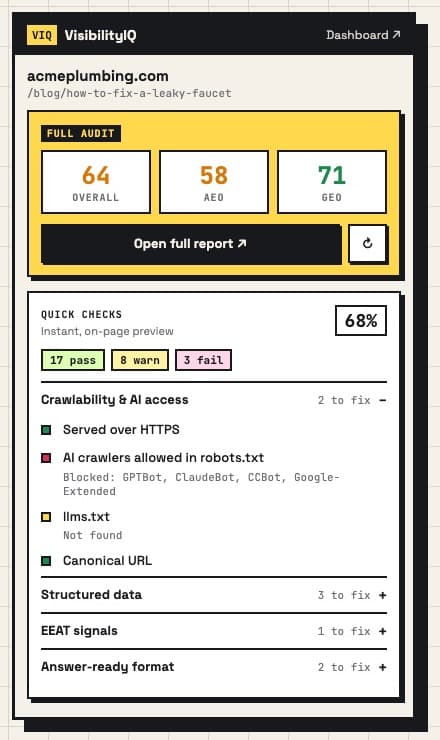
Instant quick checks
28 on-page signals the moment you open the popup: AI-crawler access, llms.txt, schema, EEAT, headings, answer-ready format.
Full AEO + GEO audit
One click runs the complete VisibilityIQ audit on the tab you're on and shows your scores right in the popup.
Right-click any link
Audit a competitor or a page you haven't opened yet straight from the context menu.
Installing from the zip.
- 1
Download and unzip
Download the zip above and double-click it. You'll get a folder called
visibilityiq-extension. Keep it somewhere permanent (e.g. Documents) — Chrome loads the extension from this folder. - 2
Open Chrome's extensions page
Paste
chrome://extensionsinto the address bar and press Enter. (Edge:edge://extensions.) - 3
Turn on Developer mode
Flip the Developer mode switch in the top-right corner of the page.
- 4
Click “Load unpacked”
Select the visibilityiq-extension folder you unzipped in step 1 — the folder itself, not the zip.
- 5
Pin it to your toolbar
Click the puzzle-piece icon next to the address bar and pin VisibilityIQ. Open any page and click the VIQ icon to audit it.